Settings
Settings holds your stake presets, your risk limits, the safety switches, the theme, the notifications and your sessions. Use this page to change one of them, or to look up a limit. Back to the guide index. Trading words are explained in the glossary.In short
- Open Settings from the bottom of the left rail, from the top-bar menu, from the menu
on a phone, or with
gthens. - The page has eight sections: Trading, Risk limits, Safety, Appearance, Account, Notifications, Hotkeys and Session. On a desktop, the list at the left takes you to a section. On a phone, each section opens as its own page.
- There is no Save button. A typed value saves when you press
↵or leave the field. A switch or a checkbox saves when you change it. - A change that makes a limit safer saves at once. A change that makes it less safe asks for your password.
The basics
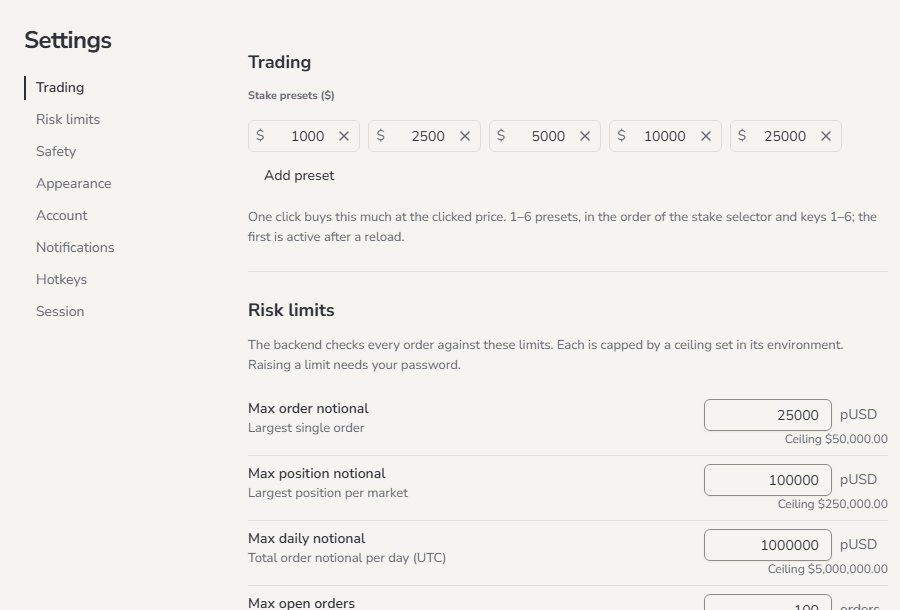
Change your stake presets
A stake preset is an amount for the stake control in the top bar (**Stake 1,000, 5,000, 25,000.- Go to Trading › Stake presets.
- Type a new amount in a field.
- Press
↵, or leave the field. The toastStake presets savedshows.
After a reload, the first preset is the active stake.
Change a risk limit
The server checks every order against your risk limits. The screen cannot go around them. Each field shows its unit, and below it the ceiling: the highest value that the server allows, for exampleCeiling $50,000 or Ceiling 120/min. You cannot save a value above
the ceiling.
- Go to Risk limits.
- Type the new value. Until you save it, the line under the field reads
Unsaved · Enter to save. - Press
↵, or leave the field. - If the change makes the limit safer, it saves at once. A toast names it, for example
Max order notional saved. - If the change makes the limit less safe, a dialog asks for your password. It names the
change, for example
Raising the max order notional needs the UI password. The UI password is the password you sign in with. - Type your password and click Save.
Max order notional not raised.
If the value cannot be saved, the line under the field gives the reason. Examples:
Above the ceiling ($50,000)Must be at least the max order notional ($25,000)Not saved · …
More options
All risk limits
The defaults suit a balance of about 500,000.
An Exit has fewer limits. An Exit only makes your position smaller. Thus these limits
do not stop it:
- Max order notional
- Max position notional
- Max daily notional. An Exit also does not count toward it.
- Max open orders
- Price band. The Exit slippage applies to an Exit instead.
- Max position notional and Max daily notional must be at least the Max order notional.
- Max combo exposure must be at least the Max combo notional.
- a higher limit
- a wider Price band or Exit slippage
- a longer Armed idle timeout
- a shorter Duplicate window
- a safety switch turned off
Raising the price band needs the UI password,
Lowering the duplicate window needs the UI password or
Turning off cancel on shutdown needs the UI password.
When you lower Max order notional, your stake presets do not change. Lower the
presets too. If you do not, a click with a larger preset is rejected.
Safety switches
The switches are in Safety.
While the heartbeat is on, the server sends a signal to Polymarket every 5 seconds. If no
signal arrives for 10 seconds, Polymarket cancels the open orders that this app placed.
The cancel can come up to 5 seconds later. Orders that you placed on polymarket.com stay.
A switch saves when you change it. Turning a switch on saves at once. Turning a switch off
asks for your password.
With both switches off, the orders that you leave open stay on the book after the server
stops, as on polymarket.com. If a cancel at shutdown fails, you get a
Cancel on shutdown failed notification at the next start.
Account
Account shows the account that the app trades for. The person who runs the server sets all of it. The page never shows a key and never asks for one.
When the Session Key expiry line shows, tell the person who runs the server. They make a
new Session Key. The server settings are in the
configuration reference.
Notifications
This section has the table of notification kinds and channels, in the groups Trading, Connection and Security. Below the table are the Volume slider and the Send test button. See Choose where notifications go.Appearance
Choose Dark, Light or System. System follows the light or dark setting of this device. The app saves the choice on the server, so it applies on every device. You can also change the theme here:- the sun or moon button in the top bar
- the menu on a phone
- the command palette: type
>, thenTheme: dark,Theme: lightorTheme: system
Hotkeys
Hotkeys lists the navigation keys. Show all hotkeys opens the full list, the same list as?. See Shortcuts.
Session
Session shows if trading is on, and the result of the last geoblock check. The geoblock check finds out if Polymarket allows trading from the location of the server.
If the status cannot load, both lines read
Status unavailable.
If Trading reads Off, tell the person who runs the server. Only they can turn trading
on.
When you log out, trading changes to Safe. A session also ends after 60 minutes with no
activity, or 12 hours after you sign in.
Good to know
- Risk limits and safety switches save one change at a time, in the order you make them.
- The ceilings protect you from a mistake when you type a value. The server reads them when it starts. Only the person who runs the server can change them. See Settings you may want to change.
- Price band, Exit slippage, Duplicate window and Armed idle timeout have fixed maximums, not a server ceiling.
- If the person who runs the server lowers a ceiling below your saved limit, the ceiling applies.
- A combo stake comes from the same presets. Thus the Max order notional also caps the presets that you can use for a combo.