Combos
A combo joins outcomes from different markets into one position. This page shows how to build a combo, get a quote for it, accept the quote and exit the combo later. Back to the guide index. Terms are explained in the glossary.In short
- A combo has 2 or more outcomes, called legs, from different markets. It pays $1 a share only if every leg wins.
- A combo has no price on the screen. You ask Polymarket’s market makers for a quote. Then you have a few seconds to Accept it.
- You can get a quote in Safe. A quote costs nothing. Accept is the one step that trades, and it needs Armed.
- Combos are not available until the account’s Session Key has the combos scope. Until
then, the Combo button is grey with the tooltip
Combos unavailable · Session Key lacks the combo scope.
The basics
Buy a combo
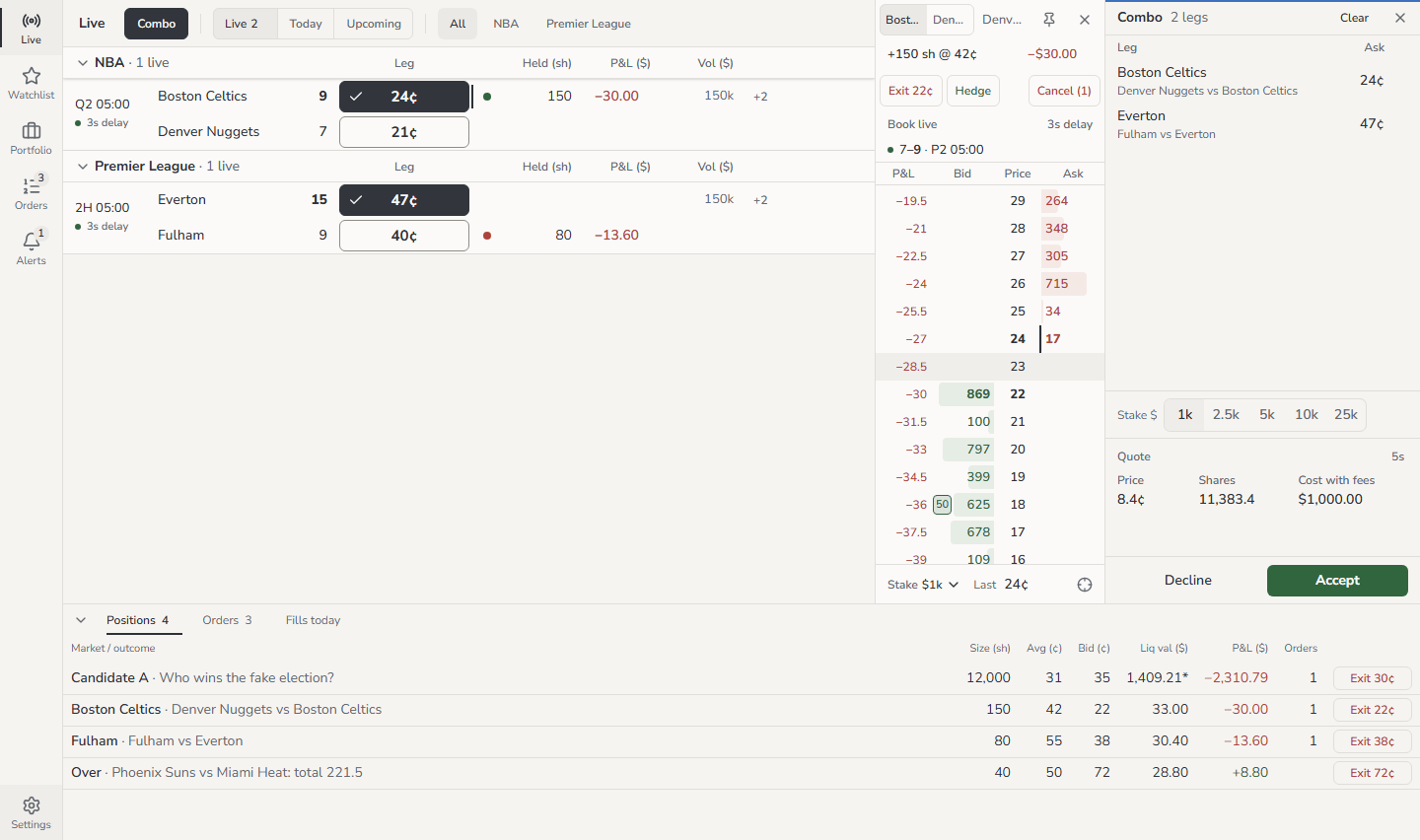
- Click Combo in the header of the Live board, the Watchlist or a market. Or
press
L. - Look at the prices. The Buy and Sell prices change to one leg button for each outcome. The button shows the best ask of that outcome.
- Click an outcome to use it as a leg. The button fills with colour and shows a tick.
- Click outcomes in other markets to add more legs. Click a filled button again to remove its leg.
- Look at the slip on the right. It shows your legs and the stake.
- Check the stake. It is the most that the combo can cost, fees included.
- Click Get quote, or press
Q. - Read the quote: Price, Shares, Cost with fees and the seconds left.
- If the switch reads Safe, click Armed.
- Click Accept before the time ends. With the slip in focus, you can also press
Ctrl ↵.
Filled · Buy 201.6 sh at 12.4¢ · $25.00. The combo is then in Portfolio, on the Combos tab.
L again. The ladder,
Portfolio and Orders work as usual while combo mode is on.
On a phone, Combo is the first item in the row of filters on the Live board. The
legs collect in a combo bar at the bottom of the screen. Tap the bar to open the slip.
Decline a quote
- Click Decline. Or, with the slip in focus, press
Esc. - The slip shows
Declined. The button reads Get quote again.
More options
Change the legs and the stake
Each leg shows its best ask now. A leg is grey when its book is stale. The slip does not
show a combined price. The quote is the only price of a combo.
Your legs stay in the slip when you reload the page. They clear when you click Clear,
close the browser tab or sign out. Combo mode is off after a reload.
Why a leg button is grey
Hover the button to see the reason. On a phone, tap the button. The reason shows in the combo bar for 3 seconds.Read the quote
The seconds left show beside the quote. Polymarket sets the time.
- Accept ignores clicks for the first half second. Thus a double click on Get quote cannot accept a quote that you did not see.
- When less than 1 second is left, Accept is grey with the tooltip
Under 1s left. - When the time ends, the slip shows
Expiredand the button reads Get new quote.
Declined · legs changed or Declined · stake changed. Cancel all also declines
a quote on the screen. It cannot stop an Accept that the app sent already.
Slip statuses
Other tooltips on a grey Get quote:
Checking combo, Trading off,
Trading state unknown, Stake presets not loaded. When you ask for too many quotes, the
tooltip shows when you can ask again, such as 12 quotes a minute · next in 8s.
The app sends a notification when a combo fills (Combo filled). It sends one when a combo
is refused after Accept (Combo rejected) or does not settle (Combo failed). These
notifications come to you also when the slip is closed. To choose where they go, see
Choose where notifications go.
Exit a combo
- Open Portfolio and click the Combos tab.
- Find the combo. Each row shows Legs, Size (sh), Avg (¢), Cost ($),
Status and Open legs, such as
2/2. - Click Exit on the row. Or select the row and press
E. This works in Safe. - Read the slip. It opens as Exit combo, with Price, Shares and Receive after fees.
- If the switch reads Safe, click Armed.
- Click Accept before the time ends.
The Status of a combo is
Open until every leg resolves. Then it is Won, Lost or
Partial. Partial means that the combo resolved with a partial payout. To list resolved
combos, turn on Show resolved. A won combo has the link Claim on polymarket.com.
The app does not claim for you.
Why a quote or Accept was refused
The app never sends a refused quote request or Accept again by itself. No quote:
Refused by the app’s checks. The app sent nothing to Polymarket. A limit message shows
the limit and your figure. If the figures are not available, it shows the text in the last
column.
When a message ends with
retry after 8s or similar, wait that time before you try again.
Refused by Polymarket or a market maker:
Good to know
-
Limits. A combo has its own risk limits:
A combo buy also counts towards Max daily notional, and each Accept counts towards Max orders per minute. Max order notional and Max position notional do not apply to combos. But your stake presets cannot be more than Max order notional, so the combo stake cannot be more either.
- Quotes per minute. You can ask for 12 quotes a minute at most. You cannot change this limit.
-
Combo positions unavailable. The app reads your combo positions from Polymarket every
minute. If it cannot read them, or the last read is more than 2 minutes old, it refuses
combo buys and exits. It cannot then check your combo exposure or the shares you hold.
The slip shows
Rejected · combo positions unavailable. - Value. A combo has no book, so the app values it at what it cost. Open combos count in the top bar’s Exposure at that cost. They are not in Value (liq), Unrealised P&L or Cost basis on Portfolio.
-
Setup. To buy a combo, your account needs an approval for Polymarket’s combos
exchange. To sell one, it needs a second approval. You set both on polymarket.com. If
one is missing, the slip shows
Rejected · not enough cash or allowance. The person who set up your account can check this with the Session Key setup runbook. - One at a time. Do not get and accept a new quote while the app checks an Accept. The first Accept can still fill.